Combinatorial search of collision-free mechanism
A simple example of how to use the combinatorial search to find a collision-free mechanism, adapting the algorithm by Li et al.[1]. More details on the algorithm can be found also in the docs Combinatorial Optimization.
The basic outline can be run as follows:
# THIS CODE IS NOT TESTED
from rational_linkages import (DualQuaternion, MotionFactorization,
                               RationalMechanism, Plotter)

if __name__ == '__main__':
    h1 = DualQuaternion.as_rational([0, 1, 0, 0, 0, 0, 0, 0])
    h2 = DualQuaternion.as_rational([0, 0, 3, 0, 0, 0, 0, 1])
    h3 = DualQuaternion.as_rational([0, 1, 1, 0, 0, 0, 0, -2])

    f1 = MotionFactorization([h1, h2, h3])

    # find factorizations
    factorizations = f1.factorize()

    # create mechanism
    m = RationalMechanism(factorizations)
    m.collision_free_optimization(max_iters=10,
                                  min_joint_segment_length=0.3)

    # plot mechanism
    myplt = Plotter(mechanism=m, show_tool=False, steps=200, arrows_length=0.2,
                    joint_sliders_lim=3.0)
    myplt.show()
This will perform full search and tries to find a collision-free design of the given
mechanism. The result will be found at iteration 4, for links shifting combination
(0, 0, 0, 1, 1, 0), and links-joint shifting combination
(-1, 1, 1, -1, -1, 1, 1, -1, -1, 1, 1, -1). The output can be seen
in the following figure:
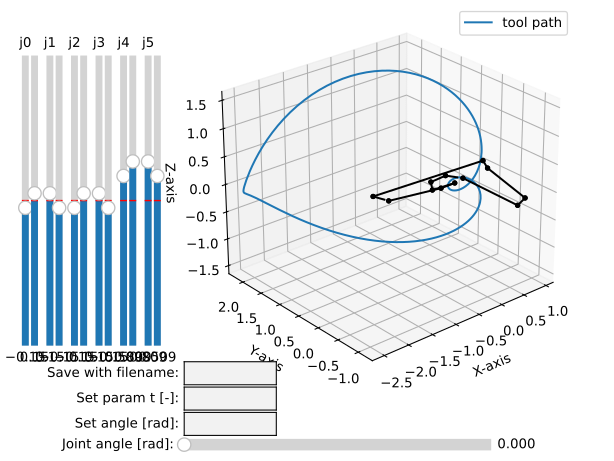
Collising-free mechanism found by combinatorial search.
For advanced search and testing, the method
RationalMechanism.collision_free_optimization() accepts along the default
arguments also these keyword arguments:
start_iteration: int
end_iteration: int
combinations_links: list
combinations_joints: list
and they can be set as follows:
from rational_linkages import (DualQuaternion, MotionFactorization,
                                   RationalMechanism, Plotter)


h1 = DualQuaternion.as_rational([0, 1, 0, 0, 0, 0, 0, 0])
h2 = DualQuaternion.as_rational([0, 0, 3, 0, 0, 0, 0, 1])
h3 = DualQuaternion.as_rational([0, 1, 1, 0, 0, 0, 0, -2])

f1 = MotionFactorization([h1, h2, h3])

# find factorizations
factorizations = f1.factorize()

# create mechanism
m = RationalMechanism(factorizations)
m.collision_free_optimization(max_iters=10,
                              min_joint_segment_length=0.3,
                              start_iteration=4,
                              combinations_links=[(0, 0, 0, 1, 1, 0)],
                              combinations_joints=[(-1, 1, 1, -1, -1, 1, 1, -1, -1, 1, 1, -1)])

# plot mechanism
myplt = Plotter(mechanism=m, show_tool=False, steps=200, arrows_length=0.2, joint_sliders_lim=3.0)
myplt.show()
References: